The crmath LaTeX Package
A LaTeX package for typesetting math stuff. Use it at your own risk. Anything might change in future versions without further notice.
- Version:
1.4
- Author:
Christoph Reller
- Download:
- The style file: crmath.styThe documentation: crmath.pdf
- Source:
- License:
The tikzmake LaTeX Package
A LaTeX package that facilitates the usage of the TikZ externalization
library in list and make mode. This includes my former “Universal Makefile
for LaTeX”. Use it at your own risk. Anything might change in future versions
without further notice.
- Version:
0.2
- Author:
Christoph Reller
- Download:
- Source:
- License:
Graphics in LaTeX with PGF
PGF (“Portable Graphics Format”) is a LaTeX-based low-level description language for
general drawing. Based on PGF there are two higher level LaTeX packages TikZ
(“TikZ ist kein Zeichenprogramm”) for drawing diagrams and pgfplots for
plotting. In this document, I give some example uses of these two packages. Many
more examples can be found here.
Being LaTeX packages, PGF/TikZ and pgfplots work inside a LaTeX document,
compiled with latex or pdflatex. PGF and TikZ are packaged together in
the package pgf. The two packages pgf and pgfplots can be installed:
as part of the LaTeX distributions “TeXlive” and “MikTeX”
For the last two options (from CTAN or development websites) the installation under
UNIX-like systems is done by simply copying the sources to ~/texmf, where ~
stands for a users home directory (e.g. /home/‹username›) or the default system
installation path (e.g. /usr/share).
Both packages come with comprehensive manuals. PGF/TikZ is documented in one manual, pgfplots in a separate manual.
TikZ
General Information and LaTeX Preamble
The PGF/TikZ package needs to be included in the LaTeX preamble as:
\usepackage{tikz}
Additionally, TikZ provides some add-on libraries which are included in the preamble as:
\usetikzlibrary{‹library name(s)›}
where ‹library name(s)› is a comma-separated list of names, e.g:
\usetikzlibrary{arrows}
In the document body, drawings are made inside a tikzpicture environment.
An example skeleton LaTeX file looks like:
\documentclass{article}
\usepackage{tikz}
\begin{document}
\begin{tikzpicture}[‹options›]
  ‹tikz command›;
  ‹more tikz commands›
\end{tikzpicture}
\end{document}
The ‹options› allow the definition of your own drawing styles as:
‹style name›/.style={‹TikZ options›}
where ‹style name› is a user-defined name, e.g. ‹options› may contain:
box/.style={draw,minimum size=6mm}
Alternatively, drawing styles can be defined in the LaTeX preamble as:
\tikzstyle{‹style name›}=[‹TikZ options›]
the above example translates to:
\tikzstyle{box}=[draw,minimum size=6mm]
If you reuse styles, then you should define them in the preamble.
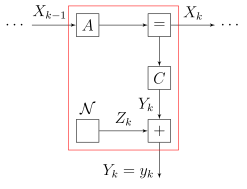
Example: Factor Graph
Used TikZ-libraries:
arrows:for
latex'arrowsfit:for the red box
\begin{tikzpicture}
[node distance=19mm,auto,>=latex',
  box/.style={draw, minimum size=0.6cm},
  short/.style={node distance=14mm}]
\node (start) {$\cdots$};
\node[box,right of=start] (A) {$A$} edge[<-] node[above,pos=0.6]
  {$X_{k-1}$} (start);
\node[box,right of=A] (eq) {$=$} edge[<-] (A);
\node[right of=eq] (end) {$\cdots$} edge[<-] node[above] {$X_k$}
  (eq);
\node[box,short,below of=eq] (C) {$C$} edge[<-] (eq);
\node[box,short,below of=C] (sum) {$+$} edge[<-] node {$Y_k$}
  (C);
\node[box,left of=sum,label={above:$\mathcal N$}] (N) {} edge[->]
  node {$Z_k$} (sum);
\node[short,below of=sum] (y) {} edge[<-] node[pos=0.2]
  {$Y_k = y_k$} (sum);
\node[box,red,inner sep=2mm,fit=(A)(eq)(C)(N)(sum)] {};
\end{tikzpicture}
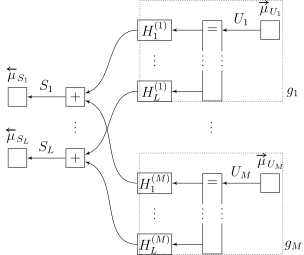
Example: More Complex Factor Graph
The TiKZ style parameter scale scales the whole picture but does not change the
text size. To change the text size too, we additionally use transform shape.
The example illustrates many other things.
Used TikZ-libraries:
arrows:for
latex'arrowsfit:for the dotted box
\begin{tikzpicture}
[scale=0.9, transform shape, node distance=17mm, auto, >=latex',
  min/.style={minimum size=5.5mm, inner sep=1pt},
  box/.style={min,draw},
  h/.style={min,draw,minimum width=10mm},
  vdots/.style={min, node distance=9mm},
  nosep/.style={inner sep=0pt, outer sep=0pt},
  dot/.style={circle,fill,nosep,anchor=center},
  lab/.style={nosep,above=4pt,minimum width=9mm},
  g/.style={box,densely dotted,inner sep=4pt}]
\pgfkeys{/dots/.code 2 args={\path (#1) -- node[dot,pos=0.25] {}
  node[dot,pos=0.5] {} node[dot,pos=0.75] {} (#2);}}
\foreach \ysh/\m in {0mm/1,-45mm/M} {
  \begin{scope}[yshift=\ysh]
    \node[box,label={[lab,name=fud\m]$\overrightarrow\mu_{U_\m}$}]
      (fu\m) {};
    \node[min,left of=fu\m] (e1\m) {$=$} edge[<-] node[above]
      {$U_\m$} (fu\m);
    \node[h,left of=e1\m] (H1\m) {$H_1^{(\m)}$} edge[<-] (e1\m);
    \node[vdots,below of=H1\m] (d3\m) {};
    \node[vdots,below of=e1\m] (d4\m) {};
    \node[vdots,below of=d4\m] (eL\m) {};
    \node[h,left of=eL\m] (HL\m) {$H_L^{(\m)}$} edge[<-] (eL\m);
    \draw (d4\m.north west) -- (e1\m.north west) --
      (e1\m.north east) --(d4\m.north east);
    \draw (d4\m.south west) -- (eL\m.south west) --
      (eL\m.south east) -- (d4\m.south east);
    \node[g,fit=(HL\m)(fud\m)(fu\m)] (g\m) {};
    \node[min,at=(g\m.south east),anchor=south west] (glab\m)
      {$g_\m$};
  \end{scope}
}
\node[nosep,fit=(g1)(gM)] (dummy) {};
\node[min,at=(dummy.center)] (dd) {};
\node[vdots,left of=dd,node distance=4cm] (dp) {};
\node[vdots,box,above of=dp] (p1) {$+$} edge[<-,out=20,in=180]
  (H11) edge[<-,out=340,in=180] (H1M);
\node[vdots,box,below of=dp] (pL) {$+$} edge[<-,out=20,in=180]
  (HL1) edge[<-,out=340,in=180] (HLM);
\node[box,left of=p1,label=above:{$\overleftarrow{\mu}_{S_1}$}]
  (s1) {} edge[<-] node[above] {$S_1$} (p1);
\node[box,left of=pL,label=above:{$\overleftarrow{\mu}_{S_L}$}]
  (sL) {} edge[<-] node[above] {$S_L$} (pL);
\foreach \top/\bot in {dp.north/dp.south, dd.north/dd.south,
  d31.north/d31.south, d41.north east/d41.south east,
  d41.north west/d41.south west, d3M.north/d3M.south,
  d4M.north east/d4M.south east, d4M.north west/d4M.south west}
  \pgfkeys{/dots={\top}{\bot}};
\end{tikzpicture}
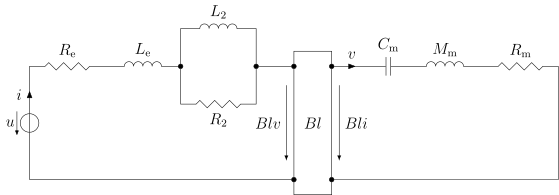
A Circuit Diagram
There are even circuit drawing libraries:
circuits.ee.IEC:for electrical circuit drawing
\begin{tikzpicture}
[circuit ee IEC,set resistor graphic=var resistor IEC graphic,
  x=2cm,y=2cm]
\newdimen\h \h=3cm;
\draw (0,0) to [voltage source={direction info={<-},info={$u$}},
  current direction={near end,info={$i$}}] ++(up:\h)
  to [resistor={info={$R_{\mathrm{e}}$}}] ++(right:1)
  to [inductor={info={$L_{\mathrm{e}}$},name=le}] ++(right:1);
\node [contact,right of=le] (c1) {};
\draw (c1) to ++(up:0.5) to [inductor={info={$L_2$}}] ++(right:1)
  to [contact={name=c2}] ++(down:1)
  to [resistor={info={$R_2$}}] ++(left:1) to (c1);
\node [contact,right of=c2] (c3) {};
\draw (c2) to (c3);
\node [contact,right of=c3] (c4) {};
\node [contact,below of=c3,node distance=\h] (c5) {};
\node [contact,right of=c5] (c6) {};
\draw (c4) to [current direction={info=$v$}] ++(right:0.5)
  to [capacitor={info={$C_{\mathrm{m}}$}}] ++(right:0.5)
  to [inductor={info={$M_{\mathrm{m}}$}}] ++(right:1)
  to [resistor={info={$R_{\mathrm{m}}$}}] ++(right:1) |- (c6);
\draw (0,0) to (c5);
\draw (c3) -- ++(up:0.2) -| (c4);
\draw (c5) -- ++(down:0.2) -| (c6);
\draw (c3) -- (c5) (c4) -- (c6);
\node (gyr) at ($(c3)!0.5!(c6)$) {$Bl$};
\draw[->,>=latex] (gyr -| c3) ++(left:2mm) ++(up:0.5) --
  node[left] {$Blv$} ++(down:1);
\draw[->,>=latex] (gyr -| c4) ++(right:2mm) ++(up:0.5) --
  node[right] {$Bli$} ++(down:1);
\end{tikzpicture}
pgfplots
General Information and Preamble
The PGF/TikZ and the pgfplots package need to be included in the LaTeX
LaTeX preamble as:
\usepackage{tikz,pgfplots}
To use the features and slightly different spacings of the newest package version you have to add the following line to the LaTeX preamble:
\pgfplotsset{compat=newest}
or:
\pgfplotsset{compat=1.5}
Plots are done inside a tikzpicture environment by using an axis
environment within which we can add curves by means of \addplot:
\begin{tikzpicture}[‹options›]
  \begin{axis}[‹axis options›]
    \addplot[‹options›] ‹plotting command›;
    ‹more commands›
  \end{axis}
\end{tikzpicture}
Different ‹plotting command›s allow three fundamentally different ways of
plotting:
Plotting of data
Plotting of an analytic function
Plotting using a
gnuplotinterface
I will only give examples for the first two.
Alternatively, ‹axis options› can be defined in the LaTeX preamble as:
\pgfplotsset{‹axis options›}
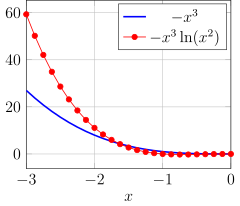
Example: Plot of an Analytic Function
The options used here are more or less self-explanatory.
\begin{tikzpicture}
\begin{axis}[xlabel=$x$,grid=major,xmin=-3,xmax=0,width=6cm]
  \addplot[blue,very thick] expression[domain=-3:0] {-x^3};
  \addplot[red,mark=*,semithick] expression[domain=-3:0]
    {-x^3*ln(x^2)};
  \legend{$-x^3$,$-x^3\ln(x^2)$};
\end{axis}
\end{tikzpicture}
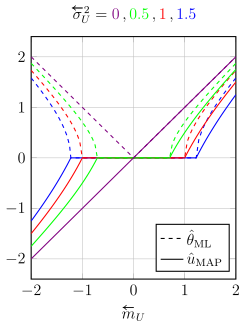
Example: More Complex Plot of Some Analytic Functions
In the \addplot command, we can leave away the keyword expression. The
command \addplot+ append the given options to default options. This behavior is
used in conjunction with cycle list to automatically cycle through a defined list
of colors. The exact position of plotting points can be given by samples
at=‹list›. The position of the legend is determined with legend
pos=‹position›. The vertical alignment of legend entries can be specified by
legend cell align=‹alignment›. The actual legend is done manually by
\addlegendimage and \addlegendentry.
\begin{tikzpicture}
\begin{axis}
  [width=7cm,height=8cm,xmin=-2,xmax=2,grid=major,
    no markers,thick,xlabel=$\mb{U}$,
    legend pos=south east,legend cell align=left,
    cycle list={blue,blue,red,red,green,green,violet,violet},
    title={$\sigmab{U}^2={\color{violet}0}\,,{\color{green}0.5}
      \,,{\color{red}1}\,,{\color{blue}1.5}$}]
  \addlegendimage{dashed}
  \addlegendentry{$\hat{\theta}_\mathrm{ML}$}
  \addlegendimage{solid}
  \addlegendentry{$\hat{u}_\mathrm{MAP}$}
  \foreach \ss in {1.5,1,0.5,0} {
    \pgfmathsetmacro{\sq}{sqrt(\ss)};
    \pgfmathsetmacro{\sqp}{\sq + 0.05};
    \def\samplist{-2,-1.95,...,-\sq,-\sq,\sq,\sqp,...,2,2}
    \addplot+[dashed,samples at=\samplist] {sqrt(max(x^2-\ss,0))};
    \addplot+[solid,samples at=\samplist] {(x^2-\ss)/x};
  }
\end{axis}
\end{tikzpicture}